Idea Browser & My Channels
Idea Browser turns YouTube browsing into a structured research loop. Use blackout, the Focus Sidebar, quick actions, and saved channels to collect stronger ideas instead of losing them across tabs, bookmarks, and random notes.
Best for creators who want a repeatable research and inspiration workflow, not just ad hoc browsing when they are stuck.
Why Creators Use Idea Browser
Make browsing usable
Instead of passively scrolling YouTube, turn browsing into a system for surfacing stronger ideas, titles, and reference videos.
Save the strongest signals
Use blackout and Focus Sidebar to filter away weaker ideas so high-signal videos stand out faster.
Keep your research organized
Saved channels, history, transcripts, and thumbnail-space actions help you revisit good finds instead of starting over every session.
How The Browsing Loop Works
Open from Niche Finder or My Channels
Start in the Idea Browser tab or jump in through a saved creator when you already know which channel you want to study.
Search a topic or channel
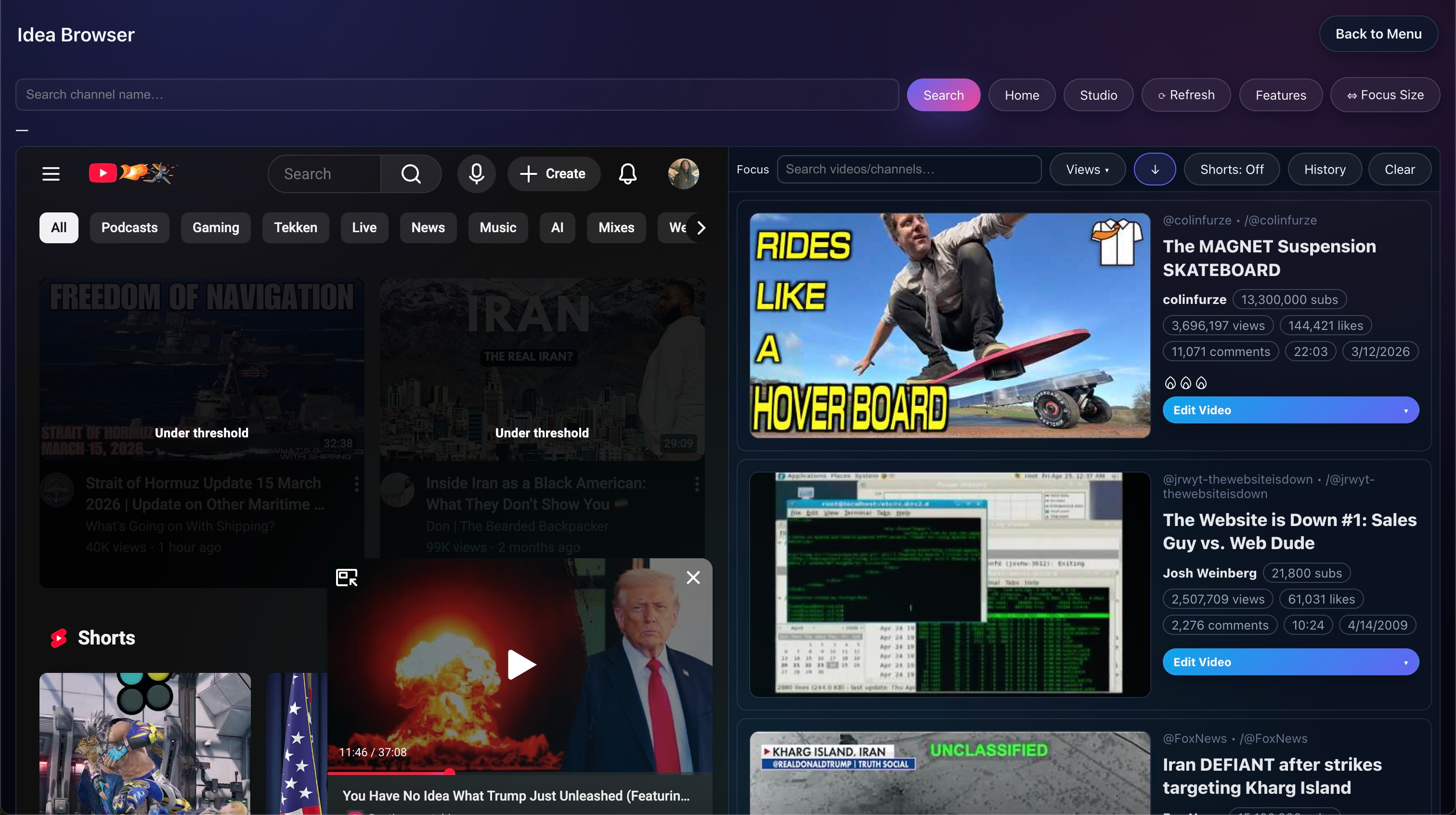
Load a page of ideas, then use blackout to dim weaker videos and make stronger candidates easier to scan.
Use the Focus Sidebar
Sort by views, likes, comments, date, subscribers, or views-per-subscriber to see what is actually worth studying.
Take action on winners
Copy links, copy transcripts, add items to Thumbnail Space, and keep the strongest candidates in history for later.
What Makes It More Than A Browser
Blackout
Set a view threshold and dim low-performing videos so the best ideas stand out visually without leaving the page.
Focus Sidebar
The right-side panel surfaces the strongest videos with stats, sorting, and quick actions instead of forcing you to scan everything manually.
One-click actions
Copy links, copy transcripts, or send good thumbnail references to Thumbnail Space without breaking the research flow.
Saved channels
My Channels gives you one-click access to the creators you study most often, so you are not constantly retyping handles or URLs.
The Main Reason The Workflow Is Useful
Sort by what matters
Filter the sidebar by title or channel text, then sort by views, likes, comments, date, subscribers, or views-per-subscriber depending on what you care about.
Decide how broad to go
Toggle sort direction, include Shorts when appropriate, and set minimum-view preferences so the list matches your workflow.
Keep good finds
The docs describe an auto-saved history so promising videos do not disappear just because the list refreshed or you navigated away.
A Few Good Ways To Use It
Channel checkup
Enter a creator handle, turn on blackout, and skim the top-performing ideas in Focus Sidebar to understand what is actually working.
Keyword hunt
Search a topic to compare titles, traction, and packaging signals, then adjust blackout thresholds to match your goals.
Thumbnail pick list
Save visual winners to Thumbnail Space as you go, so packaging research stays connected to the idea workflow.
What Access Includes
Platinum workflow
The docs label Idea Browser as a Platinum feature and position it as part of the larger research and channel-management stack.
Connected to My Channels
Saved channels are not separate from the workflow. They are meant to make repeated research faster and more deliberate.
Feeds scripting and packaging
The strongest use case is not browsing for its own sake. It is finding ideas that then feed scripts, thumbnails, and production choices.
What To Read Next
Channel Dashboard Analytics
See how My Channels expands into range-based channel totals, per-video analytics, and synced website dashboard access.
Open pageNiche Finder
See the broader research hub that feeds into Idea Browser, Similar Channels, and thumbnail pattern discovery.
Open pageThumbnail Creator
Take the strongest thumbnail references you saved here and turn them into your own packaging workflow.
Open pageScript Shufflr
Use copied transcripts and research notes as raw material for script generation and rewriting.
Open pageMain docs
Read the full walkthrough for blackout, Focus Sidebar sorting, quick actions, history behavior, and analytics sync.
Open docsPricing
Use pricing if repeatable research, channel tracking, and synced analytics are core parts of why you want Fractal.
See plansWant The Full Idea Browser Workflow?
Use the docs if you want the deeper breakdown, or jump to pricing if this research loop is already clearly part of your stack.