
Thumbnail Creator
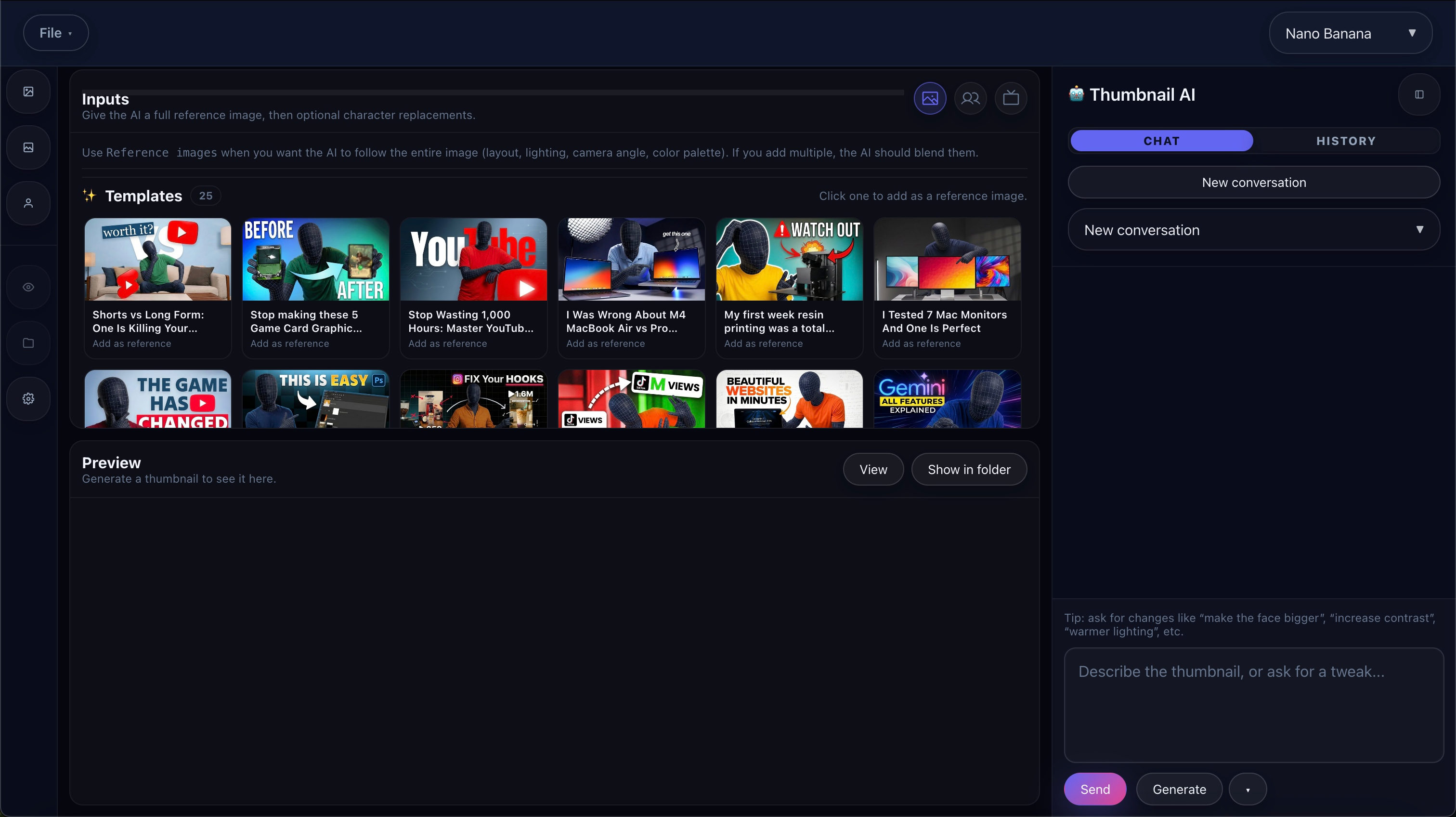
Thumbnail Creator keeps packaging inside the same workflow as research and production. Use references, prompts, variants, and gallery review to develop thumbnails that match the angle of the video you are actually making.
Best for creators who do not want packaging to be an afterthought or to live in a separate disconnected tool.
Why Creators Use It
Keep packaging tied to the video
Develop thumbnails in the same ecosystem as your scripts, niche research, and production workflow instead of treating them like a separate project.
Use references on purpose
Show the AI real examples of the style you want so you are steering toward a packaging direction, not just generating random art.
Iterate like a workflow, not a one-off
Generate, review, tweak, and save the best variants so packaging gets better through repetition rather than starting from zero every time.
How Thumbnail Creator Works
Add references
Start with 2 to 6 reference thumbnails if you want the AI to follow a specific visual direction or packaging style.
Describe the thumbnail
Write the subject, emotion, background, large text idea, and general style in plain language.
Generate variants
Use the prompt and references together to create multiple thumbnail options without leaving the workflow.
Review in Gallery
Compare outputs, refine the prompt, and keep iterating until the packaging direction feels strong enough to keep.
Save the winners
Store your best results in the Library or Personal Thumbnail Space so they stay usable across future projects.
What Makes The Outputs Better
Reference images
The docs recommend adding 2 to 6 strong examples so the system has a clear packaging style to emulate.
Plain-language prompting
Describe subject, emotion, big text, background, and style in everyday language instead of treating the feature like a complicated prompt-engineering exercise.
Gallery review
Use the gallery as a decision surface, not just a dump of outputs. Compare variants and keep refining until one direction stands out.
Save flow
The best variants can be saved for later so packaging work compounds instead of disappearing after a single session.
How It Connects To The Rest Of Fractal
Research first
Use Niche Finder and Thumbnail Gallery to spot patterns, then move into Thumbnail Creator with a clearer sense of what is working in the niche.
Production-aware packaging
Because the tool lives inside Fractal, your thumbnail direction can evolve alongside the actual video angle instead of drifting away from it.
Reusable winners
Saving results to Library or Personal Thumbnail Space helps you build a packaging system instead of a one-time image batch.
What Access Includes
Platinum packaging workflow
The docs present Thumbnail Creator as a Platinum feature and connect it with Personal Thumbnail Space for ongoing iteration.
Reference-led generation
This is not just generic image generation. The intended workflow is packaging-specific and built around references, prompts, and reviews.
Useful for repeatable channels
It is especially strong when you want a repeatable thumbnail look or when you are trying to tighten the loop between topic selection and packaging.
What To Read Next
Niche Finder
Use Niche Finder first if you want to study winning thumbnails and broader niche patterns before generating your own packaging.
Open pageIdea Browser
Spot high-performing thumbnails and save examples while you are browsing channels and ideas.
Open pageCreate With AI
Pair packaging work with video shufflrion workflow when you want thumbnails and video direction to develop together.
Open pageMain docs
Read the full Thumbnail Creator walkthrough for the reference-image flow, gallery loop, and save process.
Open docsPricing
Check pricing if integrated thumbnail creation is one of the workflows you want to unlock.
See plansNeed The Full Thumbnail Workflow?
Read the docs if you want the full packaging walkthrough, or go straight to pricing if this is one of the workflows you care about most.