
Advanced Editor
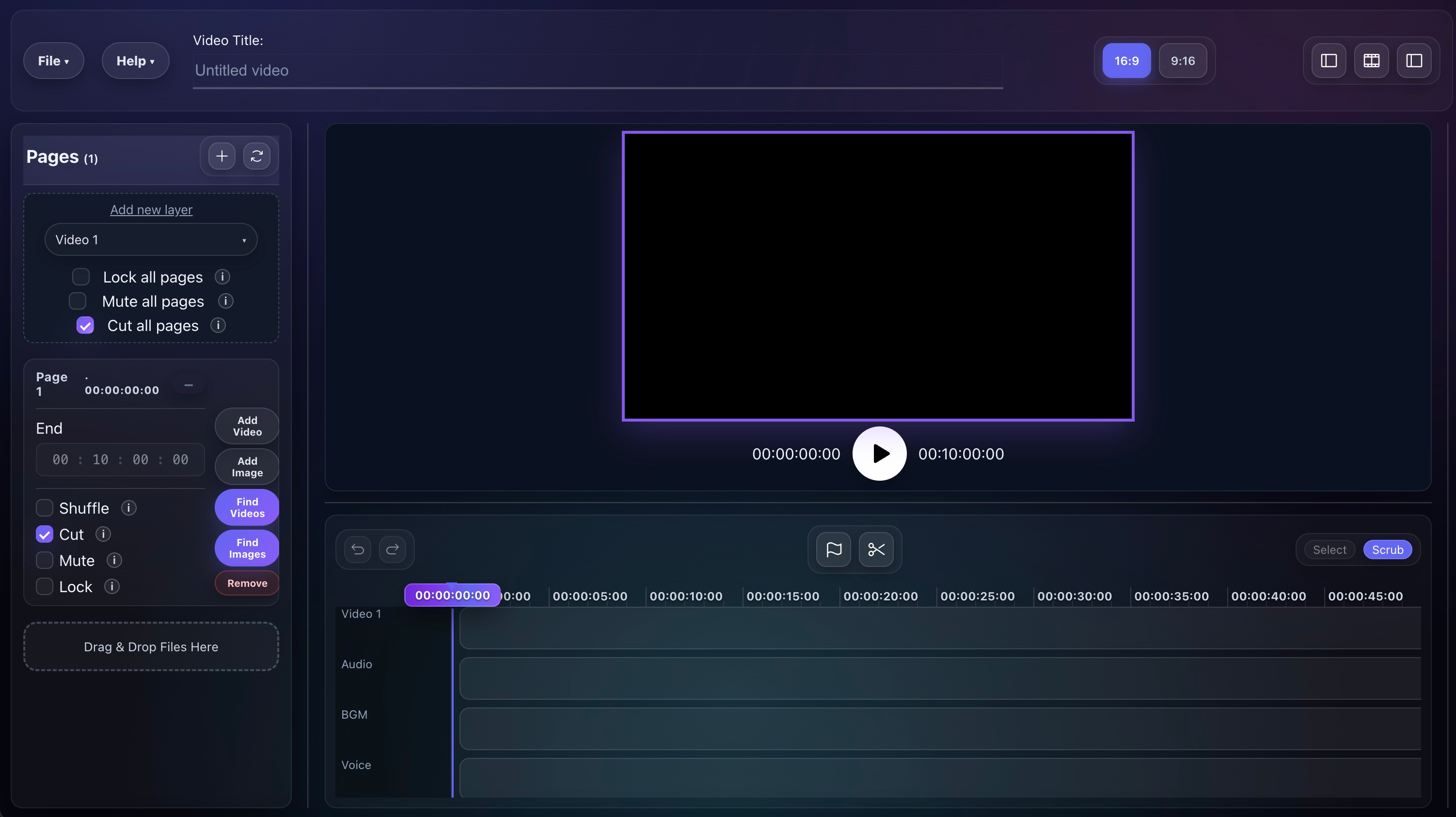
Advanced Editor is Fractal's structured editing workspace for section-based builds, planned review, quick settings, sourced images, and custom motion clips. It sits between fast automation and fully custom timeline work.
Best for creators who want section order, pacing controls, and review tools without leaving Fractal for a separate editor.
Why Creators Use Advanced Editor
Keep structure intact
Build hooks, intros, body sections, and outros as separate pages so the final export preserves your intended order.
Iterate quickly
Use compact quick settings for audio, cuts, clip length, total duration, and review behavior without digging through a heavy settings flow.
Fix weak segments before export
Preview the planned result, refresh only the parts you dislike, and keep the rest of the plan intact.
How The Editing Flow Works
Create sections
Add pages like Hook, Intro, Body, and Outro so the project has a structure instead of one flat clip bucket.
Add source media
Drop in videos, images, or even YouTube links, then let the editor split and arrange clips based on your rules.
Set pacing rules
Adjust min and max clip length, total duration, audio behavior, and review settings from the compact controls.
Generate the plan
Run Shuffle & Merge to either export directly or generate a planned preview when review-before-merge is enabled.
Review and export
Refresh weak segments, replace timestamps, reorder planned clips if needed, then export the final cut.
Controls That Matter Most
Audio and cut toggles
Control remove audio, auto-detect cuts, review-before-merge, and whether Script Shufflr is shown in the workspace.
Clip length sliders
Use minimum and maximum clip length plus total duration to shape pacing without manually trimming every segment.
YouTube links as inputs
Paste YouTube URLs directly into the editor and let Fractal download them as sources for the build.
Section-level structure
Assign clips to individual pages, move files between sections, and preserve overall section order in the export.
What Else Lives Inside The Editor
Pages and ordered merge
Create multiple sections, assign end times when needed, and keep the export in Hook → Body → Outro order while still shuffling inside each page.
Find Images
Search for images without leaving the editor, add them to a section, and let Fractal convert them into short motion clips automatically.
Add Custom
Create short text-led motion graphics with solid, image, or video backgrounds for hooks, lower-thirds, disclaimers, and end cards.
Preview First, Then Commit
Generate a planned edit
With review-before-merge enabled, Shuffle & Merge creates a reviewable set of planned clips instead of exporting immediately.
Refresh weak segments
Replace only the clips that miss the brief instead of rebuilding the whole sequence from scratch.
Replace and reorder
Use timestamp replacement, include or exclude options, drag-and-drop ordering, and the scrubber to curate the final plan.
Import, Preview, And Export Details
Image handling
Per-section Add Image and Find Images flows turn stills into motion clips so mixed-media sections feel natural in sequence.
Script attachment
Create With AI projects carry their script into the inspector, and you can also add or edit script content manually.
WebM import
Pro supports WebM inputs while still exporting MP4, which helps if your source media arrives in web-first formats.
Advanced flags
The docs call out optional extras like smooth transitions, higher-quality encoding, and smart shuffle ordering for teams that want more tuning.
Where It Fits In The Stack
Core Pro feature
Advanced Editor is a strong fit when the free shuffle flow is too loose but a full Video Creator project would be heavier than you need.
Bridge between automation and manual work
It gives you more control than one-click editing while staying faster and narrower than a full production workspace.
Connected to adjacent tools
The docs explicitly tie it to pages, review-before-merge, image sourcing, and the wider Video Creator workflow.
What To Read Next
Review Before Merge
See the preview-and-refresh workflow that makes Advanced Editor much more controllable before export.
Open pageSmart Clip Logic
Go deeper on the pacing rules, clip length logic, and shuffle behavior that support the section workflow.
Open pageVideo Creator
Use Video Creator if the project needs scripts, AI scenes, timeline assets, and a bigger production workspace.
Open pageMain docs
Read the complete walkthrough for quick settings, pages, Find Images, Add Custom, review flow, and WebM support.
Open docsNeed The Full Advanced Editor Walkthrough?
Use the docs if you want every subfeature and workflow detail, or go straight to pricing if you already know this control layer fits your editing style.